Quick Facts
- The 253 Myth: While a standard /24 subnet theoretically allows for 253 IP addresses, most consumer-grade router hardware hits a performance wall between 20 and 50 devices.
- Hardware Floor: For a stable smart home with over 50 devices, aim for a router with at least a Quad-core processor and 256MB to 512MB of RAM.
- Wi-Fi 6 Capacity: Mid-range Wi-Fi 6 routers comfortably support 40 to 75 devices by using OFDMA to group small IoT data packets together.
- Wi-Fi 7 Potential: New Wi-Fi 7 models are designed to handle 200 or more concurrent connections through Multi-Link Operation and wider data streams.
- The Thread Advantage: Using thread smart home networking offloads low-power sensors from your Wi-Fi, creating a self-healing mesh that reduces router congestion.
- Current Usage: A 2024 survey by NETGEAR and YouGov found that 89% of home broadband users currently manage between 1 and 20 connected devices.
A typical home router effectively supports 20 to 50 devices, while high-end Wi-Fi 6 and Wi-Fi 7 models can manage 60 to 200+ concurrent connections. Actual smart home networking capacity is determined by hardware specifications like the processor and RAM, along with efficiency technologies like MU-MIMO and OFDMA, rather than just the available IP address pool.
The Real Limits: Why Your Router Struggles with 50+ Devices
If you have ever noticed your smart bulbs becoming unresponsive or your streaming video buffering just as your smart blinds start their evening routine, you have likely hit your router capacity for smart homes. Many users are confused by the difference between router capacity and ip address limit. Technically, a standard router uses a DHCP lease pool that can assign up to 253 unique IP addresses. However, just because a router can give a device a "name" doesn't mean it has the processing power to talk to it.
The primary bottleneck in smart home networking is rarely the available IP addresses; it is the physical hardware inside the plastic box. Every time a smart sensor "checks in" to report temperature or a smart plug waits for a command, it creates a small burst of data. In a house with 50+ devices, this "IoT chatter" becomes a constant roar.
To manage this, your router needs a powerful Quad-core processor to handle the routing logic and sufficient RAM to maintain the connection table. While 128MB of RAM was sufficient five years ago, modern smart homes benefit significantly from 256MB or 512MB. Flagship gaming and mesh routers often pack 1GB of RAM specifically to prevent the network from crashing under high IoT device density. If you are wondering how to check wifi router device limit, start by looking up your model's CPU and RAM specs; if they aren't listed prominently, the device is likely built for light, 15-device households.
Beyond the internal memory, the Local Area Network (LAN) becomes congested when too many devices try to talk at the exact same millisecond. Basic routers use a "first-come, first-served" approach, which leads to network latency. This is why professional smart home networking setups prioritize hardware that can process multiple streams of data simultaneously.
Wi-Fi 6 vs. Wi-Fi 7: Choosing the Right Standard for IoT Density
The evolution of Wi-Fi standards has shifted focus from raw speed to managing device density. For anyone building a smart home in 2026, understanding the leap from older standards to Wi-Fi 7 is crucial.
| Wi-Fi Standard | Practical Device Limit | Key IoT Feature | Recommended Use Case |
|---|---|---|---|
| Wi-Fi 5 (802.11ac) | 15 - 25 | Basic MIMO | Small apartments, minimal IoT |
| Wi-Fi 6 (802.11ax) | 40 - 75 | OFDMA & Target Wake Time | Average smart homes (50+ devices) |
| Wi-Fi 7 (802.11be) | 200+ | Multi-Link Operation (MLO) | High-density, future-proofed homes |
While mid-range WiFi 6 routers are generally capable of supporting 40 to 50 devices comfortably, Wi-Fi 7 is the real game-changer for managing network congestion in smart homes. One of the most significant features of Wi-Fi 7 is Multi-Link Operation (MLO). This allows a device to send and receive data across different frequency bands (like 5GHz and 6GHz) simultaneously. This prevents the "bottleneck" effect where a high-bandwidth security camera blocks the signal for a low-power smart lock.
Furthermore, Wi-Fi 6 introduced OFDMA efficiency, which allows the router to chop a single wireless channel into smaller sub-channels. Instead of the router talking to one device at a time, it can package data for eight different smart sensors into a single transmission. When searching for the best wifi router for 50 plus smart home devices, always look for a Tri-band frequency model. Having a dedicated 6GHz band or a secondary 5GHz band allows you to move high-traffic devices, like 4K cameras, away from the crowded 2.4GHz band used by older smart home tech.
Offloading the Router: What is Thread Networking?
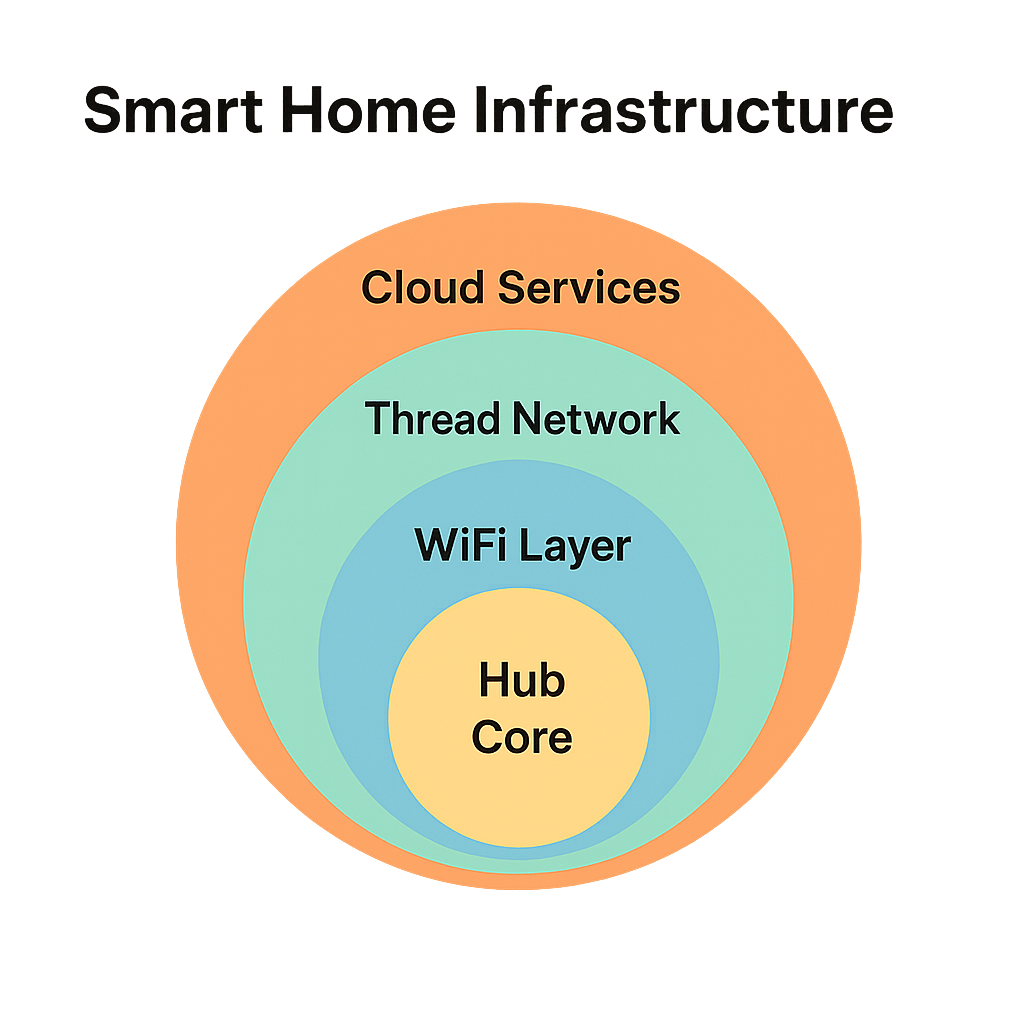
One of the most effective ways to increase your router's capacity is actually to move devices off the Wi-Fi entirely. This is where thread smart home technology comes into play. If you find yourself asking what is thread networking, think of it as a specialized language designed specifically for small, battery-operated smart home devices.
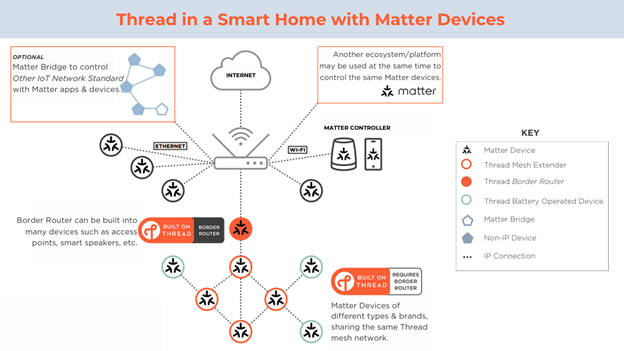
Unlike Wi-Fi, which follows a "star topology" where every device must talk directly to the central router, Thread uses a mesh architecture. In a Thread network, every mains-powered device (like a smart plug or light switch) acts as a mesh nodes. If a sensor in the basement needs to send a signal, it doesn't have to reach the router upstairs; it just talks to the nearest smart plug, which passes the message along.
The benefits of thread smart home networking include:
- Reduced Router Load: Since the devices talk to each other, the router only sees one "Border Router" instead of 50 individual sensors.
- Lower Latency: Thread is optimized for tiny data packets, meaning your lights turn on instantly.
- Self-Healing: If one smart plug is unplugged, the network automatically finds a new path for the data to travel.
When considering thread vs matter smart home standards, remember that Matter is the "language" devices speak to understand each other, while Thread is the "road" they travel on. By using Thread-enabled devices, you significantly lower the chance of your Wi-Fi router becoming overwhelmed by hundreds of concurrent connections. This synergy ensures that even as you scale your home automation, your primary Wi-Fi remains fast for laptops and gaming consoles.
Managing High-Density Networks: Segmentation and Security
As you approach the theoretical limit of approximately 250 connected devices, performance isn't your only concern—security and organization are equally important. High-density smart home networking requires a more sophisticated approach than just plugging things in and hoping for the best.
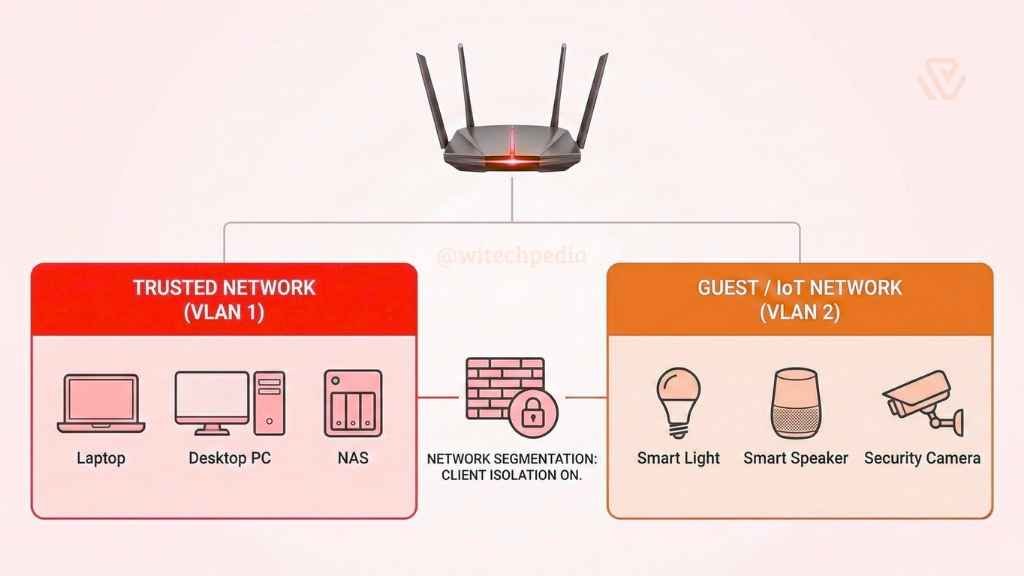
One of the most effective strategies for managing network congestion in smart homes is network segmentation. Most modern routers allow you to create a "Guest Network" or, in more advanced models, a dedicated IoT VLAN (Virtual Local Area Network). By putting your smart cameras, smart plugs, and sensors on a separate sub-network, you isolate their traffic. This prevents a "chatty" smart light bulb from interfering with a Zoom call on your work laptop.
Security also becomes a factor as device counts rise. Every new IoT device is a potential entry point for hackers. Ensure your router supports WPA3, the latest security standard, which provides better encryption for individual devices. You should also keep a close eye on bandwidth distribution. High-definition security cameras can consume significant data throughput, while a temperature sensor uses almost none. Use your router's Quality of Service (QoS) settings to prioritize time-sensitive data (like video doorbells) over background updates.
Editor's Tip: If you are experiencing signal attenuation in a large home, don't just add a cheap Wi-Fi extender. Extenders often halve your bandwidth. Instead, invest in a Tri-band mesh system where the nodes have a dedicated wireless backhaul to talk to each other.
Summary of Best Practices for Router Capacity
To ensure your smart home stays responsive as you grow, follow these hardware and software guidelines:
- Audit Your Count: If you have more than 30 devices, it is time to move away from the free router provided by your ISP.
- Look for MU-MIMO: Multi-User, Multiple Input, Multiple Output (MU-MIMO) allows the router to send data to multiple devices at once rather than in a sequence.
- Prioritize Wi-Fi 6E or 7: These standards open up the 6GHz band, which is less prone to interference from neighbors' networks.
- Use Hubs Wisely: Systems like Philips Hue or IKEA Home Smart use Zigbee or Thread hubs. These are excellent because they "hide" dozens of bulbs from your Wi-Fi router, showing up as only one connected device.
FAQ
What is a smart home network?
A smart home network is a specialized setup of hardware and software designed to connect household devices—like lights, locks, cameras, and appliances—to each other and the internet. It typically involves a central router or mesh system and uses various protocols such as Wi-Fi, Zigbee, Z-Wave, or Thread to allow for automation and remote control via smartphones or voice assistants.
Is there a device to get internet without a provider?
You cannot access the global internet without an Internet Service Provider (ISP), but you can use mobile hotspots or satellite links (like Starlink) as alternatives to traditional cable or fiber companies. For local smart home networking, you can still have a functional "smart home" without an active internet connection if your devices support local control protocols like Zigbee, Z-Wave, or Matter over Thread, though you won't be able to control them when away from home.
What are the 4 types of networking?
In a broad technical sense, the four main types of networks are Personal Area Networks (PAN) like Bluetooth connections, Local Area Networks (LAN) such as your home Wi-Fi, Metropolitan Area Networks (MAN) covering a city, and Wide Area Networks (WAN) like the internet itself. In a smart home context, we often focus on the distinction between Wi-Fi, mesh networks (Thread/Zigbee), and hardwired Ethernet connections.
How do you tell if your Wi-Fi is being monitored?
You can check for monitoring by logging into your router's administrative dashboard and reviewing the "Connected Devices" or "DHCP Client List" to see if there are any unrecognized users. Additionally, look for spikes in data usage or use a network analyzer app to see if data is being routed to unusual external IP addresses. If your network feels sluggish despite having a high-capacity router, it could be a sign of unauthorized traffic or congestion.