Quick Facts
- Primary Control Hub: Users should navigate directly to the new Search Services History menu to manage cross-service data harvesting.
- Service Reach: A single toggle now impacts Search, Maps, Lens, Translate, News, Shopping, Flights, and Hotels.
- Gemini Retention: Even after activity is turned off, Google may retain previously saved chat data for up to three years.
- Critical Setting: Disabling Save Media is essential to stop Google from using uploaded images and audio for multimodal machine learning models.
- Privacy Sentiment: A 2026 study reveals that 42% of UK adults intentionally limit their use of AI tools due to security concerns.
- Default Status: Most Google search privacy settings default all users into expanded AI training sets unless manually configured otherwise.
To prevent Google from using your search data for AI training, navigate to your Google Account My Activity page and locate the Search Services History menu. Disabling this feature stops Google from using your searches, location data, and uploaded media from Search, Maps, and Lens to refine its machine learning models. If the new menu is not yet available, turning off Web & App Activity provides similar protections for your search history and improves your overall ai data privacy profile.
The 2026 AI Privacy Landscape: Why You Must Opt Out
As we move further into a world dominated by generative AI, the distinction between private data and public training sets has become dangerously thin. In the early days of the internet, your search history was primarily used to serve ads. Today, that same footprint is used for model refinement, feeding the neural weights of massive multimodal systems. This shift has triggered significant ai data privacy concerns among the global population.
For many users, the realization that Google's default privacy policy includes an expanded AI training that includes uploaded media, such as images and audio files, has been a wake-up call. Recent data suggests that 59% of consumers are uncomfortable with how their personal interactions are used to train these systems. These ai privacy issues examples are not just theoretical; they impact how your digital persona is understood and replicated by machine learning algorithms.
We are seeing a growing trend of digital footprint management where individuals actively curate what they share. According to the Digital Futures Institute, 29% citing data privacy and security concerns is now the primary reason for limiting engagement with AI tools. Understanding how to manage your generative ai data privacy is no longer a niche technical skill—it is a foundational aspect of modern digital stewardship.
Step 1: Navigating the Search Services History Hub
Google has recently consolidated its privacy controls into a more centralized interface, but finding the exact switches to stop google from training ai with my data can still be a challenge. The most significant update is the Search Services History dashboard, which governs a massive swath of Google’s ecosystem.
To secure your data, follow this breadcrumb path: Google Account > Data & Privacy > History Settings > Search Services History. Once there, you will find granular privacy controls that affect at least eight major services:
- Search: Your daily queries and clicked results.
- Maps: Your frequent locations and navigation patterns.
- Lens: Photos you take to identify objects or translate text.
- Translate: The text and documents you provide for conversion.
- News, Shopping, Flights, and Hotels: Your commercial intent and travel interests.
Within this hub, look specifically for the Save activity from Search Services and Save media toggles. While the activity toggle manages text-based logs, the media toggle is the front line of defense against providing training data for multimodal AI. By turning these off, you effectively implement how to opt out of google ai training for the bulk of your search-related activities.
For users still on the older interface, the google web and app activity privacy settings remain the core area for management. Disabling Web & App Activity stops the continuous collection of your search history, which is a vital step in maintaining ai privacy and security across multiple devices.
Step 2: Disabling Gemini Apps Activity and Human Review
Gemini represents a different category of privacy risk. Unlike traditional search, Gemini is a conversational partner, and the logs from these interactions are incredibly rich in context. To manage this, you must visit the Gemini Apps Activity settings directly.
When you use generative AI, Google uses those conversations for model refinement. A major point of concern is the human review oversight process. Google’s default privacy settings for Gemini allow human reviewers to read and process user conversations to verify the model's accuracy. These conversations are "anonymized," but they can still contain personal identifiers if you aren't careful with sensitive info redaction.
To opt out:
- Go to myactivity.google.com.
- Select Gemini Apps Activity.
- Toggle the switch to Off.
By completing the google gemini apps activity opt out, you ensure that future conversations are not stored in your account or used for subsequent training. However, it is important to remember that this does not automatically delete your history; it only stops future collection. To achieve true digital footprint management, you should also manually delete previous chat history or set an auto-delete schedule.
Step 3: Protecting Gmail and YouTube Content
Your emails and watch habits are some of the most intimate data points Google possesses. Over the years, Google has integrated AI training into these services to improve search predictions and "smart" features. Protecting these areas is essential for robust ai privacy and security.
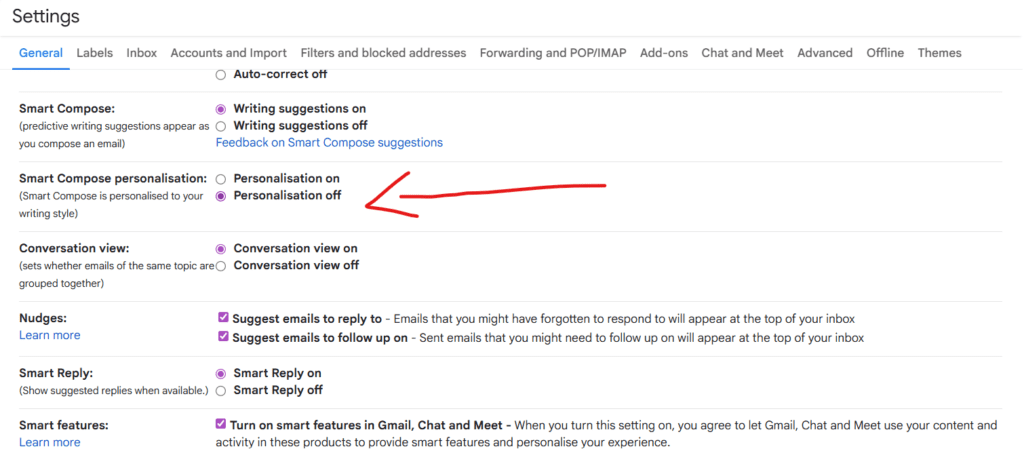
In Gmail, the system learns from your correspondence to facilitate autocomplete and categorization. To stop this, open Gmail on your desktop, go to Settings > See all settings > General, and scroll down to Smart features and personalization. Unchecking this box prevents Google from analyzing your email content for these automated services. This is a critical move for anyone concerned about how their professional and personal communications contribute to broad machine learning ethics datasets.
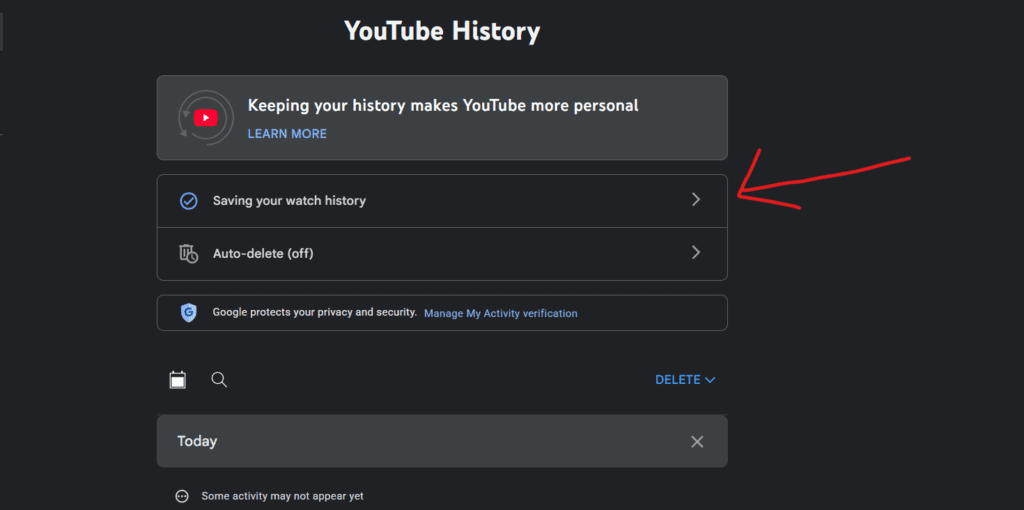
YouTube is another major pillar. Because YouTube data includes video, audio, and comments, it is a goldmine for multimodal AI. You should navigate to the Data and Privacy tab of your Google Account and find YouTube History. Here, I recommend turning off the history entirely or setting an auto-delete schedule of three months. This action helps to turn off ai training on youtube and gmail by limiting the longitudinal data available for Google to ingest.
Feature vs. Opt-out Path Comparison
| Google Feature | Primary Control Hub | Action Required |
|---|---|---|
| Search & Maps Media | Search Services History | Disable 'Save Activity' & 'Save Media' |
| Gemini Chat | Gemini Apps Activity | Toggle Activity switch to 'Off' |
| Email Content | Gmail Settings > General | Uncheck 'Smart features and personalization' |
| YouTube Activity | YouTube History Settings | Pause History or set 'Auto-delete' |
| Global Web History | Web & App Activity | Toggle 'Off' to prevent future tracking |
The Reality Check: The Retroactive Gap and 3-Year Retention
While following these steps will significantly improve your ai data privacy, there is a technical limitation known as the "Retroactive Gap" that every user should understand. When you opt out today, it stops Google from collecting data for future training. However, data that has already been ingested and used to calculate the "weights" of a neural network cannot be easily "unlearned" by the AI.
Reality Check: The Data Retention Policy Even if you delete your Gemini activity today, Google maintains a safety and quality buffer. Conversations that have been selected for human review can be retained by Google for up to three years. These snippets are disconnected from your Google Account to protect your identity, but they remain part of Google's internal research and safety datasets. This highlights why following enterprise privacy standards is so difficult for individual consumers—the data you share today has a very long tail.
This three-year window is a standard part of Google's data retention windows for AI products. It serves as a reminder that the best way to maintain your privacy is to never share sensitive information with a generative AI in the first place. Stewardship of your data starts with prevention at the point of input.
FAQ
Does AI have data privacy?
Artificial intelligence itself does not have a right to privacy, but the data used to train it is subject to varying degrees of protection. The challenge in ai data privacy is that once personal information is integrated into an AI model's training set, it becomes difficult to remove or isolate. Current regulations like GDPR and the EU AI Act are attempting to define how individual privacy rights apply to these distributed machine learning models.
What shouldn't you share with ChatGPT?
You should never share sensitive personal information, proprietary business data, passwords, or private medical details with ChatGPT or any other generative AI. Because these systems often use user prompts for model refinement and may use human reviewers to check outputs, any information you type into the chat box should be considered potentially viewable by the service provider's employees or contractors.
What was Stephen Hawking's warning about AI?
Stephen Hawking warned that the development of full artificial intelligence could spell the end of the human race. He was concerned that AI would take off on its own and re-design itself at an ever-increasing rate. Because humans are limited by slow biological evolution, Hawking believed we would be unable to compete and would eventually be superseded by autonomous systems.
What did Stephen Hawking say about AI before he died?
Before his death, Stephen Hawking emphasized that while AI has the potential to help undo some of the damage done to the natural world and eradicate disease and poverty, it also carries enormous risks. He stated that unless we learn how to prepare for, and avoid, the potential risks—such as autonomous weapons or the loss of human control—AI could be the worst event in the history of our civilization.
Managing your personal information in the age of generative models requires active participation. By navigating your Search Services History and Gemini settings today, you take a necessary step toward digital autonomy. I recommend performing a full privacy checkup annually to ensure your settings haven't been reset by service updates.