Our Top Picks
Replacing a standard Starlink router with the best mesh wifi system 2026 significantly improves network stability and coverage, especially for large properties. We recommend the TP-Link Deco BE63 for value and the Netgear Orbi 970 for ultimate performance.
- Best Overall WiFi 7 Value: TP-Link Deco BE63 – Offers a perfect balance of Wi-Fi 7 speed and affordability for most households.
- Best Performance for Large Estates: Netgear Orbi 970 Series – Unmatched range and quad-band throughput for those who want the absolute best.
- Best Budget Upgrade: TP-Link Deco XE75 – A reliable Wi-Fi 6E solution for users who want to eliminate dead zones without the WiFi 7 price tag.
- Best for Signal Penetration: ASUS ZenWiFi BQ16 – Exceptional performance for homes with thick interior walls or complex layouts.
Replacing a standard Starlink router with a modern mesh system significantly improves network stability and coverage. Stock Starlink equipment often uses older Wi-Fi standards that struggle with thick walls and high device density. A Wi-Fi 7 mesh setup provides broader range, advanced security features, and the ability to manage dozens of devices simultaneously across large properties.
| Model | WiFi Standard | Max Coverage (sq ft) | Peak Speed | Best For |
|---|---|---|---|---|
| TP-Link Deco BE63 | WiFi 7 | 7,600 (3-pack) | 10 Gbps | Balanced performance |
| Netgear Orbi 970 | WiFi 7 | 10,000 (3-pack) | 27 Gbps | High-end estates |
| TP-Link Deco XE75 | WiFi 6E | 7,200 (3-pack) | 5.4 Gbps | Budget-conscious |
| ASUS ZenWiFi BQ16 | WiFi 7 | 8,000 (2-pack) | 25 Gbps | Thick walls/Privacy |
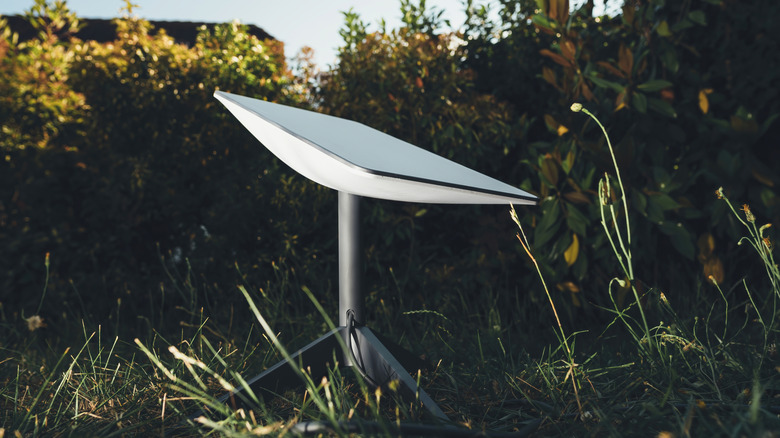
Why Replace Your Starlink Router in 2026?
As we move deeper into 2026, the demands on our home networks have evolved far beyond what standard satellite hardware was designed to handle. While Starlink has made massive strides in satellite technology, their included routers are often a step behind the cutting edge of home automation and IoT needs. If you are still using the Gen 2 hardware, you are likely dealing with a Wi-Fi 5 bottleneck. Even the newer hardware has its limits.
The Starlink Gen 3 router utilizes Wi-Fi 6 technology to provide wireless coverage for up to 3,200 square feet, an increase from the 2,000-square-foot range offered by the previous Gen 2 model. For a small suburban home, this might suffice. However, for rural properties with outbuildings, multi-story residences, or homes with modern smart appliances, 3,200 square feet is often an optimistic estimate that doesn't account for signal degradation through building materials.
In technical benchmarks, the Starlink Gen 3 router demonstrated local network transfer speeds up to four times higher than the Gen 2 router due to its transition from Wi-Fi 5 to Wi-Fi 6 and the inclusion of tri-band radios. While this is a notable improvement, replacing starlink router with mesh system 2026 hardware is the only way to truly unlock the potential of your local network. When you have dozens of smart bulbs, security cameras, and streaming devices competing for the same airwaves, the device density becomes a major factor. Standard routers begin to suffer from network latency and dropped connections as the device count climbs, whereas a robust mesh system is designed specifically for high-capacity bandwidth management.
The Technical Bridge: Starlink Ethernet Adapter & Bypass Mode
Before you can enjoy the benefits of the best mesh wifi for starlink 2026, you need to understand how to bridge the gap between the Starlink dish and your new mesh nodes. Most Starlink systems do not come with a standard Ethernet port on the router itself.
For Gen 2 (actuated) dish users, the Starlink Ethernet Adapter is a mandatory $25 accessory. This adapter sits between the dish cable and the Starlink router, providing a single 1Gbps LAN port. For Gen 3 users, the router includes two integrated Ethernet ports, which simplifies the process significantly.
Once the hardware is connected, you must enable Bypass Mode within the Starlink app. This is a critical step. When you enable Bypass Mode, you are essentially turning off the Starlink router's internal WiFi and routing functions, allowing your new mesh system to take over as the primary brain of the network. This prevents a "Double NAT" scenario, which can cause significant issues with online gaming, VPNs, and smart home remote access.
Pro Tip: Wired Backhaul is King While modern mesh systems offer incredible wireless performance, if your home is pre-wired with Ethernet (Cat6 or better), use it. A wired backhaul between your mesh nodes ensures that the communication between them doesn't use up valuable wireless bandwidth, resulting in the lowest possible network latency and the most stable seamless roaming experience.
Best High-Performance WiFi 7 Mesh Systems
By 2026, WiFi 7 has transitioned from a premium luxury to the standard for future-proof home networking. The primary advantage of a best mesh wifi 7 setup lies in its ability to utilize Multi-Link Operation (MLO). This technology allows devices to send and receive data across different frequency bands (2.4GHz, 5GHz, and 6GHz) simultaneously. For Starlink users, this means much more consistent speeds even if one band experiences temporary interference.
The TP-Link Deco BE63 stands out as the best mesh wifi system 2026 for the average high-end user. It offers 10Gbps ports, which might seem like overkill for Starlink's current download speeds, but it ensures that your local file transfers and internal smart home communication are lightning-fast. It effectively uses the 6GHz spectrum to create a high-speed wireless backhaul, which is essential for eliminating the dead zone issues often found in larger homes.
For those with expansive properties or multi-million dollar estates, the Netgear Orbi 970 series remains the gold standard. Premium third-party mesh systems like the Netgear Orbi 770 can extend Wi-Fi coverage to 8,000 square feet and support speeds of up to 11 Gbps, and the 970 series pushes those boundaries even further to 10,000 square feet. This level of coverage ensures that your signal stays strong from the front gate to the backyard patio.
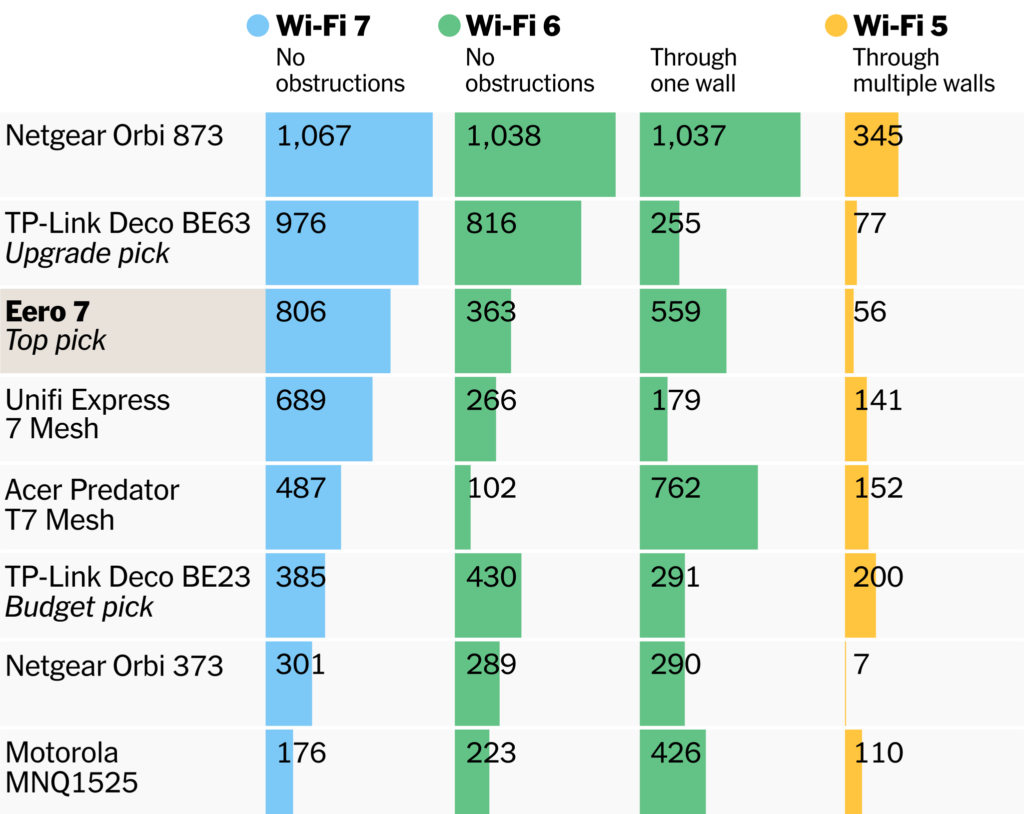
When considering the best wifi 7 mesh system 2026, many enthusiasts turn to communities to see real-world performance. The best wifi 7 mesh system reddit threads often highlight the TP-Link Deco BE85 and the Orbi 970 for their stability. Users frequently report that the 320MHz channels provided by WiFi 7 drastically reduce congestion in suburban environments where neighboring networks might overlap.
Best Mesh WiFi for Thick Walls and Rural Properties
Living in a rural area often means dealing with homes built from stone, brick, or heavy timber. These materials are the natural enemies of WiFi signals. If you've found that your Starlink signal dies as soon as you move to the next room, you need the best mesh wifi for thick walls.
The physics of signal attenuation is simple but brutal. A standard interior drywall might only reduce your signal by 3-4 dB, but a brick or concrete wall can strip away 15-20 dB of signal strength. To combat this, you need a system with powerful MU-MIMO technology and high-gain internal antennas.
| Material | Typical Signal Loss (dB) | Impact on Range |
|---|---|---|
| Drywall/Wood | 3-5 dB | Minimal |
| Brick/Cinder Block | 10-15 dB | Moderate (requires more nodes) |
| Concrete/Stone | 15-25 dB | Severe (requires wired backhaul) |
| Metal/Radiant Barrier | 20+ dB | Critical (blocks signal entirely) |
The ASUS ZenWiFi BQ16 and the eero Pro 7 are top contenders for the best mesh wifi system for thick walls. ASUS, in particular, excels because of its Tri-band Architecture and flexible AI Mesh technology. You can mix and match different ASUS routers to create a custom network that prioritizes signal penetration in the areas where you need it most. Furthermore, ASUS provides commercial-grade security features without the need for a monthly subscription, which is a major plus for budget-conscious users looking for the best budget wifi 7 mesh system.
Beamforming technology in these modern systems helps "focus" the signal toward your connected devices rather than broadcasting it in a generic circle. This is particularly useful for reaching smart cameras on the exterior of a brick house. By intelligently steering the signal, these systems maintain a higher throughput even through challenging obstacles.
Summary of the 2026 Upgrade Path
If you are ready to make the jump, here is the recommended roadmap for 2026:
- Audit your current coverage: Determine if your main issue is raw speed or coverage gaps (dead zones).
- Purchase the necessary hardware: If you have a Gen 2 dish, don't forget the Starlink Ethernet Adapter.
- Choose your mesh: Select a WiFi 7 system like the Deco BE63 for a future-proof best wifi 7 mesh for large home experience.
- Configure Bypass Mode: Ensure your Starlink app is set correctly to avoid NAT conflicts.
- Optimize Placement: Place nodes approximately 30-40 feet apart, ideally with a clear line of sight to each other if not using a wired backhaul.
By following this path, you move from a "good enough" satellite connection to a high-performance home network that rivals urban fiber installations in terms of local stability and versatility.
FAQ
What are the top-rated mesh WiFi systems for 2026?
In 2026, the market is dominated by WiFi 7 systems. The TP-Link Deco BE63 and BE85 are widely considered the best value options, while the Netgear Orbi 970 remains the top choice for absolute performance and range. For those prioritizing smart home integration, the eero Pro 7 is also a top contender due to its built-in Zigbee and Thread support.
Is a mesh WiFi system better than a traditional router?
Yes, for most modern homes, a mesh system is superior. Unlike a traditional router that broadcasts from a single point, mesh systems use multiple nodes to create a single, unified network. This eliminates dead zones and allows for seamless roaming, where your device automatically switches to the strongest node as you move throughout your property.
How many nodes do I need for full home coverage?
As a general rule, one node for every 1,500 to 2,000 square feet is recommended. For a 3,000-square-foot home, a 2-pack is usually sufficient. However, if you have thick walls or multiple floors, a 3-pack is often a safer bet to ensure that the 6GHz spectrum—which has a shorter range but higher speed—can reach every corner of the house.
What features should I look for in a future-proof mesh router?
Look for WiFi 7 support (802.11be), Multi-Link Operation (MLO), and at least one 2.5Gbps or 10Gbps Ethernet port. Additionally, ensure the system supports a dedicated wireless backhaul or a wired backhaul option. Subscription-free security and a robust mobile app for network management are also highly desirable in 2026.
Is WiFi 7 or WiFi 8 the standard for mesh systems in 2026?
By mid-2026, WiFi 7 has become the established standard for high-end and mid-range consumer networking. While early discussions of WiFi 8 (802.11bn) are occurring in technical circles, it is not yet a consumer standard. Investing in a high-quality WiFi 7 mesh system now will provide a future-proof experience for the next 4-6 years.