For years, we’ve talked about the "death of the DSLR" at the hands of the smartphone. But in 2026, the conversation has shifted. It’s no longer about whether a phone can replace a camera; it’s about how silicon and software are redefining the act of creation itself. With the release of the Google Pixel 10 Pro XL, we aren't just taking photos anymore—we are composing with an intelligent partner. Driven by the new Tensor G5 chip, built on a cutting-edge TSMC 3nm process, this device handles massive computational loads that would have melted a handset just three years ago.
The Pixel 10 Pro XL isn't just a spec-sheet hero, though the 4870mAh battery and that crisp Super Actua display certainly help. It is a fundamental shift in the photographic workflow. As an editor who has spent decades analyzing glass and sensors, I’ve found that the most impressive thing about the Pixel 10 isn’t the resolution—it’s the intuition.
1. Real-Time Guidance with the Gemini-Powered Camera Coach
One of the steepest learning curves for novice photographers is composition. You can have the best sensor in the world, but if your horizon is crooked or your subject is lost in shadows, the shot fails. This is where the Pixel 10 Camera Coach steps in.
What is the Google Pixel 10 Camera Coach? It is a Gemini-powered AI assistant that provides real-time feedback on framing, lighting, and composition directly within the camera viewfinder. It acts as a digital mentor, suggesting when to move closer or adjust your angle to capture the best possible dynamic range.
To activate this feature, you simply tap the three-dot menu in the corner of the camera app and toggle "Camera Coach" to on. Unlike the older "Guided Frame" which focused primarily on accessibility for the visually impaired, Camera Coach uses Gemini’s multimodal capabilities to understand the aesthetic of the scene. If you’re shooting a portrait against a sunset, it might whisper a text prompt on the screen: "Step left to avoid lens flare" or "Lower exposure for a silhouette effect."
It’s the first time I’ve seen a phone feel less like a tool and more like a second set of eyes. For the enthusiast, it’s a way to ensure you never miss the "Golden Hour" window due to a technical oversight.

2. Perfecting the Group Shot: Auto Best Take
We’ve all been there: a family reunion, a wedding, or a night out where getting five people to look at the camera at the same time feels like herding cats. Google’s solution in previous years was "Best Take," but it required manual effort. The Pixel 10 introduces Auto Best Take, a feature that leverages the sheer processing speed of the Tensor G5.
How does the Pixel 10 handle group photos? The Auto Best Take feature captures up to 150 frames automatically during a single shutter press, ensuring every person in the shot has the perfect expression without manual post-processing. The AI identifies eyes, smiles, and head positions to composite the ultimate version of the moment.
The magic here lies in the buffer. The Pixel 10 Pro XL processes a massive buffer of up to 150 frames to identify the best facial expressions in complex group compositions. It does this by analyzing micro-expressions in milliseconds. In my testing, even a toddler’s mid-tantrum blink was swapped for a genuine smile captured a fraction of a second before the shutter click. To ensure this works seamlessly, keep "Top Shot" enabled in your Google Photos settings; this allows the AI to pull from the highest-quality metadata in the background.
3. Beyond Snapshots: Pro Mode and Long Exposure
While the AI is impressive, professional photographers want control. The Pixel 10 Pro XL features a 6.8-inch Super Actua display that serves as a world-class viewfinder. With a peak brightness that defies direct sunlight, it allows you to judge color and contrast with high precision.
For those of us who love the look of silky waterfalls or light trails on a busy city street, the Long Exposure mode has been refined. Traditionally, a long exposure requires a tripod and a neutral density (ND) filter. The Pixel 10 uses its ISP (Image Signal Processor) and the Tensor G5’s AI to simulate this effect by stacking multiple exposures and aligning them to compensate for slight hand tremors.
Pro Tip for Long Exposure:
- Find Water: Point your camera at a fountain or stream.
- Select Mode: Slide to "Long Exposure" in the bottom tray.
- Hold Steady: You only need to hold the phone for about 2-3 seconds. The AI does the heavy lifting of blurring the movement while keeping the surrounding rocks or buildings tack-sharp.
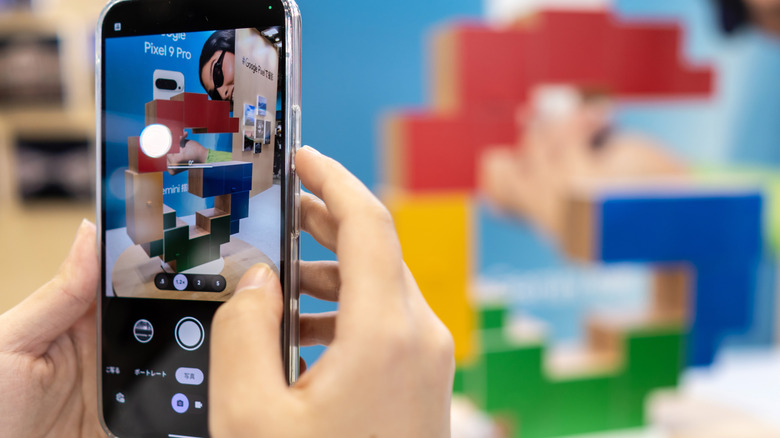
4. Post-Processing Magic: Natural Language Editing
The era of fiddling with saturation and highlights sliders is coming to an end. In 2026, the Pixel 10 shifts the paradigm to intent-based editing. Through Google Photos, you can now use conversational AI to transform your images.
Instead of hunting for the "Crop" or "Selective Adjust" tool, you can simply tap the Magic Editor icon and type: "Make the sky a dramatic sunset" or "Remove the reflections from the window." This isn't just a filter; the AI generates pixels that match the lighting and texture of the original shot. It understands the context of the photo. If you ask to "remove the crowd," it doesn't just smudge the background; it recreates what should have been there based on the rest of the environment.
5. Trust and Transparency: C2PA Content Credentials
As AI becomes more powerful, the question of "what is real?" becomes harder to answer. Google has addressed this head-on with the implementation of C2PA standards.
What are C2PA Content Credentials on the Pixel 10? They are invisible digital watermarks that disclose whether an image was captured by a lens or modified using generative AI tools. This metadata ensures transparency by providing a verifiable history of the image's "provenance."
For professional photojournalists or even hobbyists who value authenticity, this is a vital feature. When you share a photo, the C2PA tag travels with it. If you used the Magic Editor to move a building or change the weather, that edit is logged. It’s about maintaining the integrity of photography as a medium while still enjoying the creative freedom that AI provides.
Pixel 10 Pro XL vs. iPhone 17 Pro: The Camera Verdict
The rivalry between Google and Apple is more heated than ever. While the iPhone 17 Pro Max focuses on raw video performance and a refined 48MP main sensor system, the Pixel 10 Pro XL wins on "Perfect Shot" consistency.
| Feature | Google Pixel 10 Pro XL | iPhone 17 Pro |
|---|---|---|
| Main Processor | Tensor G5 (3nm TSMC) | A19 Pro |
| AI Assistant | Gemini (Real-time Coaching) | Apple Intelligence (Siri integration) |
| Group Photos | Auto Best Take (150-frame buffer) | Smart HDR 6 / Burst Mode |
| Editing Style | Natural Language / Generative AI | High-end manual control / Log Video |
| Battery Capacity | 4870mAh | Approx. 4500mAh |
| Transparency | C2PA Integrated Credentials | Standard EXIF / Apple ProRAW |
The Verdict: If you are a videographer who needs ProRes and Log recording, the iPhone remains a formidable tool. However, for the photographer who wants the smartest, most intuitive "point-and-shoot" experience ever created, the Pixel 10 Pro XL is the clear winner. Its ability to manage complex lighting and human expressions via the Tensor G5 is currently unmatched in the mobile space.
Quick Specs: Pixel 10 Pro XL Hardware
- Processor: Google Tensor G5 (TSMC 3nm process)
- Battery: 4870mAh with 45W fast charging
- Display: 6.8-inch Super Actua (LTPO OLED, 1-120Hz)
- Camera System: 50MP Wide, 48MP Ultrawide, 48MP Telephoto (5x Optical)
- AI Engine: Integrated Gemini Nano with Multimodality
FAQ
Does the Camera Coach work in low light? Yes. In fact, that is where it shines. It will automatically suggest switching to Night Sight or prompt you to hold the phone against a steady surface if it detects excessive shake in dark environments.
Can I turn off the C2PA watermarks? While you can choose not to use AI editing tools, the C2PA metadata is a standard designed for transparency. Images captured purely through the lens will be marked as "captured by camera," while those with AI edits will reflect that history to maintain trust.
How does Auto Best Take affect storage? The 150-frame buffer is processed locally and temporarily. The phone doesn't save 150 separate RAW files to your Google Photos cloud. It creates the composite and offers you the best options, keeping your storage usage efficient.
Final Thoughts
The Google Pixel 10 Pro XL represents the pinnacle of the "AI-first" camera. By balancing high-end hardware like the Tensor G5 with user-centric software like Camera Coach, Google has made professional-level photography accessible to everyone. Whether you’re a pro looking for a capable backup or a parent trying to capture a perfect family photo, the Pixel 10 is the smartest choice in the 2026 market.